
When Automation Gets Complex
When Automation Gets Complex
Making event-based automation clear, predictable, and manageable
Making event-based automation clear, predictable, and manageable
Role
Role
Sole product designer
Sole product designer
Scope
System Type
Automation system, UI,
interaction design
CRM Platform
Product
Product

Overview
Overview
In Easymaze, structured workflows are primarily managed through classification-based processes. Triggers extend this system by introducing event-driven automation, allowing actions to run when specific conditions are met. As these rules grow in number and complexity, users begin to lose clarity around system behavior and what actions are being triggered.
In Easymaze, structured workflows are primarily managed through classification-based processes. Triggers extend this system by introducing event-driven automation, allowing actions to run when specific conditions are met. As these rules grow in number and complexity, users begin to lose clarity around system behavior and what actions are being triggered.
The Problem
The Problem
While automation is meant to simplify work, growing logic often has the opposite effect. Users struggle to understand what triggers actions, when they run, and why, making the system feel complex and unpredictable.
While automation is meant to simplify work, growing logic often has the opposite effect. Users struggle to understand what triggers actions, when they run, and why, making the system feel complex and unpredictable.
The Solution
The Solution
By structuring automation around clear conditions and actions and using consistent interaction patterns, users can understand when things happen and what follows, without needing to think like a developer.
By structuring automation around clear conditions and actions and using consistent interaction patterns, users can understand when things happen and what follows, without needing to think like a developer.
Guiding Principles
Guiding Principles
Make logic visible
Automation should be clear at a glance. Structure and interactions should communicate when something happens and what follows.
Reduce cognitive load
Separating workflow structure (Processes) from event-driven behavior (Triggers) allows users to focus on one layer at a time.
Design patterns that scale
A consistent interaction model should support both simple and advanced use cases, making the system easier to learn and extend.
Make complexity manageable
Automation is inherently complex. The system should organize it into clear, predictable patterns that users can follow.
Competitive Analysis
Competitive Analysis
I explored how CRM platforms implement automation to understand common usability tradeoffs.
Most systems either lack flexibility or become difficult to manage as complexity increases.
I explored how CRM platforms implement automation to understand common usability tradeoffs.
Most systems either lack flexibility or become difficult to manage as complexity increases.


Power vs. simplicity
Balanced, but leans complex at scale
Very powerful, highly complex
Moderate flexibility
Very simple, limited power
Scalability of logic
Becomes cluttered with many branches
Scales deeply but hard to manage
Fragmented automation logic
Limited scalability
Clarity & predictability
Clear at small scale, harder to follow later
Difficult without technical knowledge
Hard to track rule interactions
Very clear but basic
Mental model consistency
Visual but breaks with complexity
Technical, not intuitive
Logic often hidden in forms
Very simple and consistent
Key Takeaways
Key Takeaways
Flexibility often reduces clarity
As automation systems become more powerful, their logic becomes harder to understand, making it difficult for users to predict and trust system behavior.
Simplicity limits scalability
Tools that prioritize ease of use often struggle to support more complex, real-world workflows as user needs grow.
Fragmented logic creates confusion
When automation is managed across multiple places, users lose visibility into how the system behaves, making it harder to track, maintain, and debug workflows.
These insights informed a design that prioritizes clarity over branching logic, consolidates configuration into a single structured flow, and maintains consistency across different levels of complexity.
These insights informed a design that prioritizes clarity over branching logic, consolidates configuration into a single structured flow, and maintains consistency across different levels of complexity.
Mental Model
Mental Model
Automation systems typically follow a simple structure:
Automation systems typically follow a simple structure:
Trigger
Trigger
Conditions
Conditions
Actions
Actions
Most systems configure all of this logic in a single place, which becomes difficult to manage as workflows grow.
The challenge is not the model itself, but how clearly it is expressed as complexity grows.
Most systems configure all of this logic in a single place, which becomes difficult to manage as workflows grow.
The challenge is not the model itself, but how clearly it is expressed as complexity grows.
To address this, Easymaze separates automation into two complementary layers:
To address this, Easymaze separates automation into two complementary layers:
1
1
Processes
Processes
Defines the structured flow of work, including stages, tasks, assignments, classifications, and timing.
They represent what should happen as part of the expected workflow.
Defines the structured flow of work, including stages, tasks, assignments, classifications, and timing.
They represent what should happen as part of the expected workflow.
2
2
Triggers
Triggers
Defines dynamic behavior, what happens when specific conditions are met during a task, sale, or service.
They represent how the system should respond to events.
Defines dynamic behavior, what happens when specific conditions are met during a task, sale, or service.
They represent how the system should respond to events.
This separation reduces complexity and makes automation easier to understand, predict, and manage.
This separation reduces complexity and makes automation easier to understand, predict, and manage.
To make this model usable in practice, it was translated into a visual interface where users compose triggers using condition and action cards, mirroring the underlying logic.
To make this model usable in practice, it was translated into a visual interface where users compose triggers using condition and action cards, mirroring the underlying logic.
Starting Point
Starting Point
The existing trigger screen applied design system components but relied on a static, hardcoded structure. Conditions were limited to a fixed set of system properties, and the interface couldn't support custom field logic. A design system overhaul was also underway in parallel.
The existing trigger screen applied design system components but relied on a static, hardcoded structure. Conditions were limited to a fixed set of system properties, and the interface couldn't support custom field logic. A design system overhaul was also underway in parallel.

Developer-facing implementation, prior to product design involvement
Developer-facing implementation, prior to product design involvement
Key Design Decisions
Key Design Decisions
Flexible configuration
Flexible configuration
Expanded the system from predefined rules to support any field, allowing automation to scale with user needs.
Expanded the system from predefined rules to support any field, allowing automation to scale with user needs.
Progressive disclosure through rule cards
Progressive disclosure through rule cards
Instead of exposing all options at once, inputs appear only when relevant, reducing cognitive load and keeping the interface focused.
Instead of exposing all options at once, inputs appear only when relevant, reducing cognitive load and keeping the interface focused.
Adaptive structure per data type
Adaptive structure per data type
Rule cards adjust based on the selected field or system property, supporting complex cases while maintaining a consistent interaction pattern.
Rule cards adjust based on the selected field or system property, supporting complex cases while maintaining a consistent interaction pattern.
Constraining logic to maintain clarity
Constraining logic to maintain clarity
Triggers use an AND-only model without branching, preventing overly complex flows and keeping automation predictable and easy to make sense of.
Triggers use an AND-only model without branching, preventing overly complex flows and keeping automation predictable and easy to make sense of.
These decisions shaped how the system balances flexibility with clarity.
These decisions shaped how the system balances flexibility with clarity.
From Model to Interface
From Model to Interface
The interface mirrors the underlying mental model, breaking configuration into two clear steps:
defining when a trigger runs, and what happens when it does.
The interface mirrors the underlying mental model, breaking configuration into two clear steps:
defining when a trigger runs, and what happens when it does.
Trigger Details - When it Runs
Trigger Details - When it Runs
General Details
General Details
Defines the trigger’s scope, including entity, execution behavior, and event type.
Defines the trigger’s scope, including entity, execution behavior, and event type.

Trigger Rules
Trigger Rules
Conditions are configured as individual rule cards, each representing a field or a predefined system property.
Conditions are configured as individual rule cards, each representing a field or a predefined system property.
All rules follow a simple model: the trigger executes only when all conditions are met (AND logic).
This keeps behavior predictable as complexity grows.
All rules follow a simple model: the trigger executes only when all conditions are met (AND logic).
This keeps behavior predictable as complexity grows.

Rule cards adapt to the type of data being configured, allowing the system to support different use cases without changing the interaction pattern.
Rule cards adapt to the type of data being configured, allowing the system to support different use cases without changing the interaction pattern.
Trigger Actions - What Happens
Trigger Actions - What Happens
A table provides a clear overview of all configured actions, making it easy to understand what will happen when the trigger fires.
A table provides a clear overview of all configured actions, making it easy to understand what will happen when the trigger fires.

Each action is configured in a contextual sidebar that adapts based on the selected action type. This allows users to focus on one action at a time while maintaining a consistent interaction pattern.
Each action is configured in a contextual sidebar that adapts based on the selected action type. This allows users to focus on one action at a time while maintaining a consistent interaction pattern.
Actions are independent of one another, meaning execution order does not affect the outcome.
Actions are independent of one another, meaning execution order does not affect the outcome.
This removes the need to manage dependencies and keeps system behavior consistent.
This removes the need to manage dependencies and keeps system behavior consistent.
The sidebar adapts to each action type, allowing the interface to remain focused while supporting a wide range of configurations.
The sidebar adapts to each action type, allowing the interface to remain focused while supporting a wide range of configurations.
While each action type requires different inputs, all follow the same configuration pattern:
While each action type requires different inputs, all follow the same configuration pattern:

Assignment - Simple Configuration
Minimal input keeps common actions quick to configure.
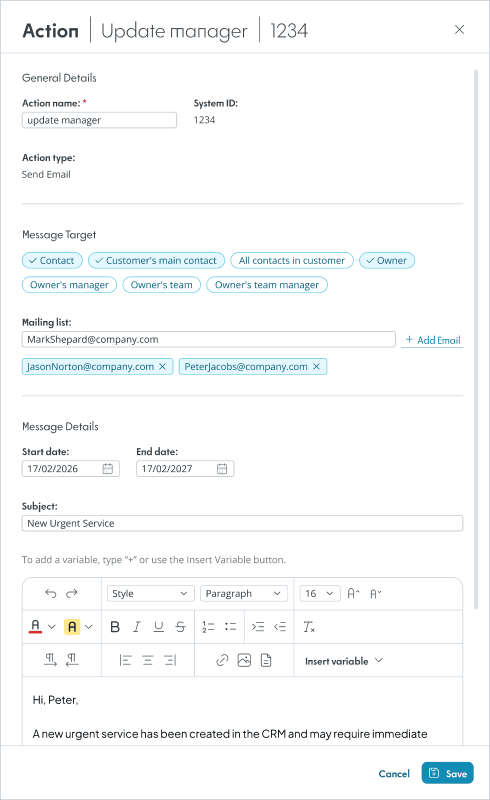
Email - Structured Communication
Define recipients, timing, and message content.
Use variables to personalize communication.

Task - Process-aware Configuration
Configure task details within the context of the workflow
Assignment - Simple Configuration
Minimal input keeps common actions quick to configure.
Email - Structured Communication
Define recipients, timing, and message content.
Use variables to personalize communication.
Task - Process-aware Configuration
Configure task details within the context of the workflow
This approach supports a wide range of actions while maintaining a consistent and easy-to-learn interface.
This approach supports a wide range of actions while maintaining a consistent and easy-to-learn interface.
Summary
Summary
This project focused on making event-based automation easier to understand and manage as complexity grows. By aligning system behavior with a clear mental model and reinforcing it through consistent interaction patterns, automation becomes more predictable and easier to follow—reducing errors and helping users configure and maintain complex logic with greater confidence and trust in how the system behaves.
This project focused on making event-based automation easier to understand and manage as complexity grows. By aligning system behavior with a clear mental model and reinforcing it through consistent interaction patterns, automation becomes more predictable and easier to follow—reducing errors and helping users configure and maintain complex logic with greater confidence and trust in how the system behaves.
Instead of removing complexity, the solution organizes it, allowing users to configure powerful logic while maintaining clarity and control.
Instead of removing complexity, the solution organizes it, allowing users to configure powerful logic while maintaining clarity and control.
Next Steps
Next Steps
As automation scales, maintaining clarity and confidence becomes more challenging. Several improvements could further support users as complexity grows:
As automation scales, maintaining clarity and confidence becomes more challenging. Several improvements could further support users as complexity grows:
Improving Visibility and Safe Iteration
Improving Visibility and Safe Iteration
Help users better understand and validate automation behavior through activity logs, and preview tools that make it easier to test configurations before activation.
Help users better understand and validate automation behavior through activity logs, and preview tools that make it easier to test configurations before activation.
Assisted configuration with AI
Assisted configuration with AI
Use an AI assistant to help users generate trigger setups from simple descriptions, giving them a strong starting point while keeping full control over the final configuration.
Use an AI assistant to help users generate trigger setups from simple descriptions, giving them a strong starting point while keeping full control over the final configuration.
© 2025 Maya Sarel
© 2025 Maya Sarel